Intro
The problem
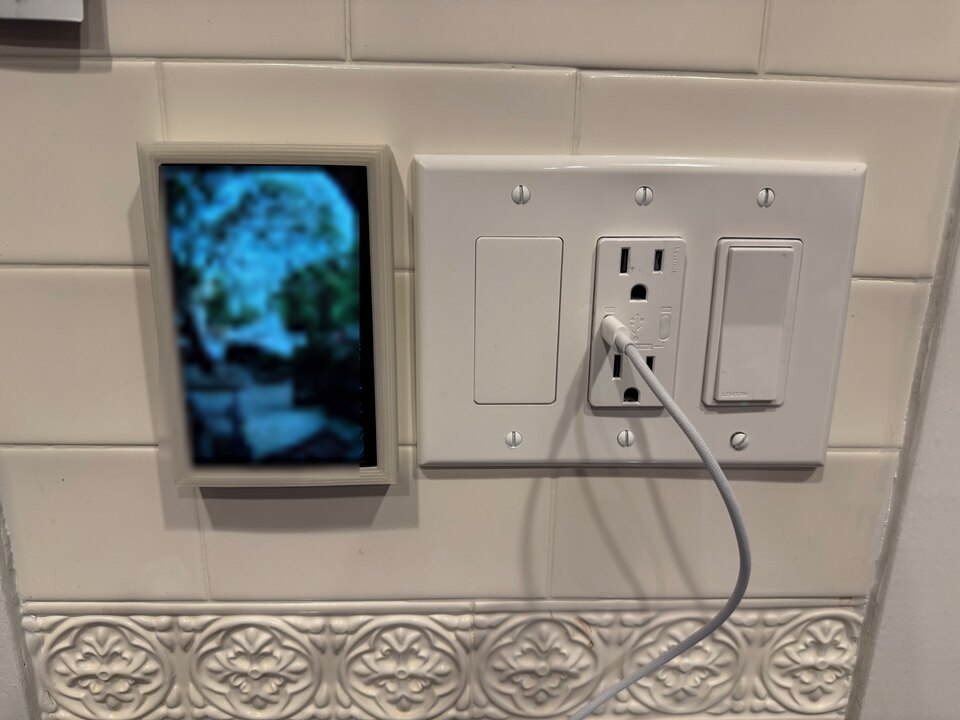
My front door has no window or peephole so when the doorbell rings I have to pull out my phone and open the Unifi Protect app. Unifi sells a wall display for this, the Unifi Access Intercom Viewer at $199, but it's built for the Unifi Access ecosystem and won't display generic Protect cameras or doorbells like the Doorbell Lite I have.
A partial fix: Apple TV
The Apple TV actually pops up a live camera feed when a doorbell rings or motion is detected but the Apple TV has to be on for this and it's specific to Apple. The Unifi Protect accessories are bridged into Apple Home through Scrypted. I want that same glanceable doorbell view in other parts of the house whether or not the TV is on.
The prototype
I built the first version as a Raspberry Pi Unifi Protect doorbell
viewport but it was a prototype running on a full Linux
computer, running mpv, a Python daemon speaking Unifi Protect's WebSocket protocol, and a stack of Raspberry Pi
display quirks (fkms connector names, fbcon holding the DRM device, hardware decode segfaults) held together with
Ansible.
ESP32 Solution
I set out to build a more robust solution on an ESP32 devboard with the same screen I used with the RPI.
The display knows nothing
The RPI version handled a lot of logic on the display device. It authenticated against Unifi Protect, had to know the doorbell's camera ID, and how to parse a proprietary WebSocket event stream, pull an RTSP feed, decode H.264, and rotate video to portrait.
When I rebuilt it as the esp32-poe-scrypted-viewport appliance,
I moved as many of those concerns off the device and into Scrypted as practical. Scrypted
handles authentication, camera selection, video decoding, scaling, rotation, overlays, and layout. It renders finished
pixels and pushes them to the display. The display just paints them and reports when the touchscreen is tapped.
The whole design follows from one rule:
If it changes what should be shown, it belongs in the controller (Scrypted). If it changes how pixels reach the screen, it belongs in the display (ESP32).
The hardware
The hardware appliance is a Waveshare ESP32-P4-ETH driving a Hosyond 5" 800×480 IPS touchscreen over MIPI-DSI.
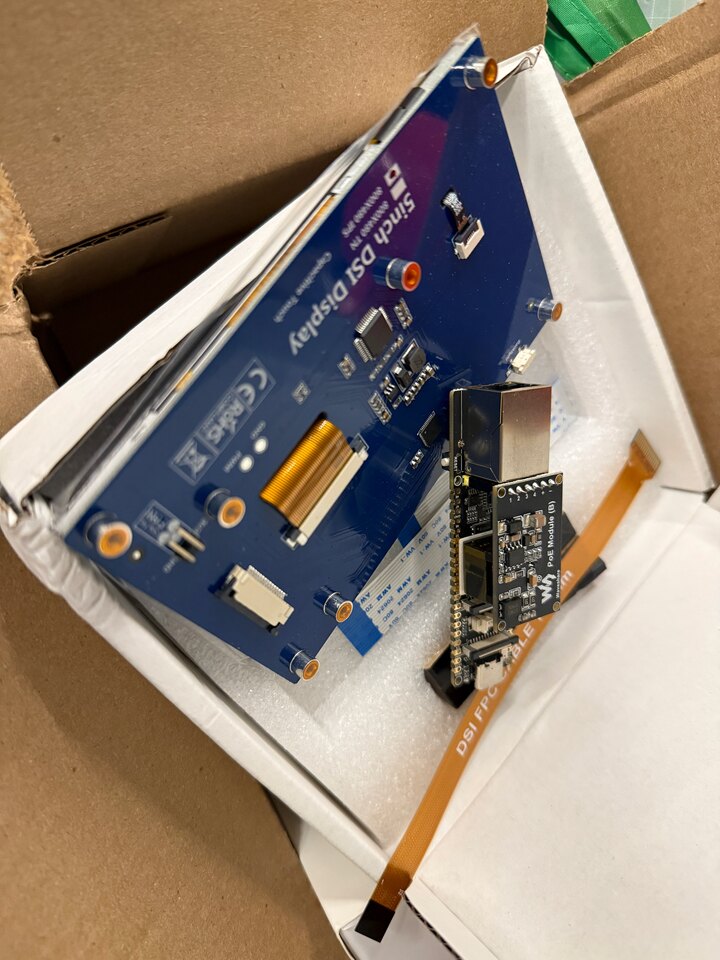
The ESP32-P4 is an awesome fit, and unusually for an ESP32 it has no Wi-Fi at all. For a permanently mounted appliance I see that as a feature:
- Ethernet, with optional PoE. A single cable, and with PoE it carries power too. No batteries, no Wi-Fi credentials, no wireless coverage worries. Plug it into a trusted VLAN and it works.
- Hardware JPEG decode. The P4 has a dedicated JPEG engine, so the controller can push compressed frames and the display decodes them without touching the CPU.
- MIPI-DSI + PSRAM. Enough memory bandwidth to triple-buffer a real display and paint full-motion video tear-free.
The device boots, pulls a DHCP lease, advertises itself over mDNS (_scrypted-viewport._tcp), and waits. It has no
configuration UI, no authentication, and no business logic. All configuration is pushed to it by the controller after
discovery.
Plug and play
A key design goal is that this is built for a plain trusted residential network. Onboarding a display is simply plugging in one Ethernet cable:
- Plug in. PoE is optional, the architecture only needs Ethernet, but with a cable already run to the wall, one drop carrying power and data beats a separate USB adapter.
- Get an address. The display pulls a DHCP lease the moment the link comes up.
- Announce itself. It publishes an mDNS service (
_scrypted-viewport._tcp) advertising its name, address, and capabilities. - Get discovered. Controllers browse for that service, pick the display up automatically, and push it its configuration. Nothing is typed into the device.
That's the whole setup. There's no companion app, no BLE pairing, no QR code scanning, no handing over Wi-Fi credentials, and no Thread commissioning. To be clear, NFC or BLE provisioning is genuinely great for devices that mesh wirelessly. But a wired display just doesn't need to be that complex on a trusted wired network.
Enclosure
I designed a flush-mounted, single cable, roughly the footprint of the standard light switch wallplates. The enclosure is a two-piece 3D-printed design built around a standard electrical single-gang rough-in.
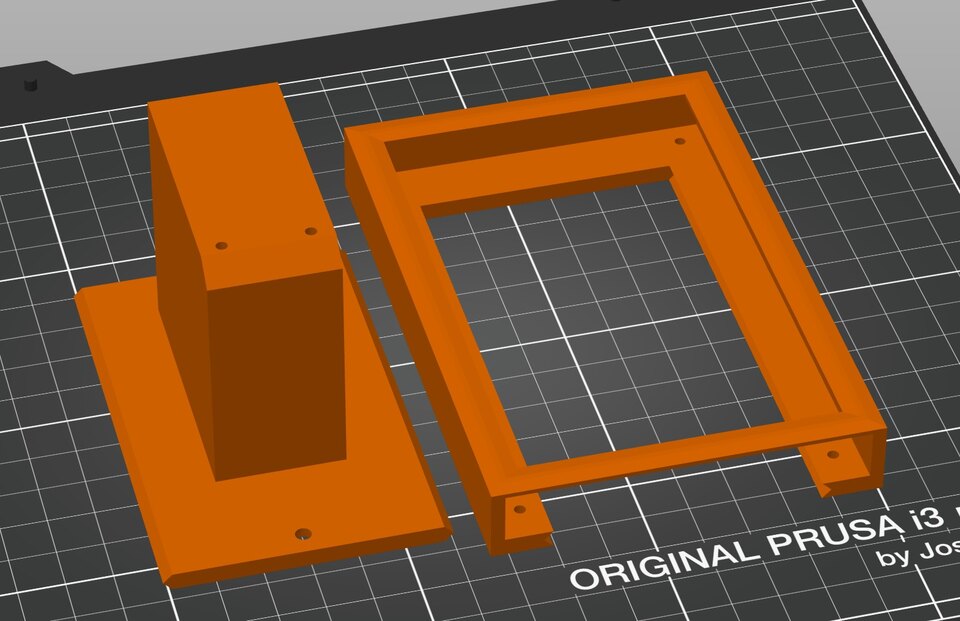
- Bracket. A base that fits over a standard 1-gang low-voltage mounting box. The ESP32-P4-ETH board tucks neatly inside the wall cavity behind it so the only thing outside the wall is the display screen.
- Screen carrier. A separate front bracket that holds the 5" panel and has a dovetail on its back to mate with the mounting bracket. The carrier slides down over a matching dovetail on the bracket, locking the screen to the wall while keeping the board and cabling fully concealed behind it.
The protocol
The display's network API is intentionally tiny. It exposes a handful of HTTP endpoints and one raw TCP socket, and everything is pushed to it:
POST /frame— paint a single JPEG. This is the whole interaction for still content: a calendar, a weather panel, a dashboard. Render a picture, POST it, tap-to-view.- A raw TCP stream socket — for live content, the controller opens a socket and pushes framed MJPEG straight at the panel with no per-frame HTTP overhead. This is how doorbell video gets to 24 fps.
POST /state— wake or sleep. The backlight is fully off when idle, and the controller wakes it when something's worth showing.POST /config— the controller pushes name, orientation, brightness, and its own callback URL after discovery. Nothing is typed into the device.
Note: As of the time of writing this, no ESP32 chip has hardware H.264 decode (though the P4 does have H.264 encode) which is why I went with MJPEG.
Touch goes the other way: a tap toggles wake/sleep and the device POSTs the resulting state back to the controller as a peer, not a request/response. The display owns its own state, and the controller and the display are symmetric peers that each serialize their own writes and trust idempotency to converge. There's no auth and no TLS. It's a LAN-only appliance on a trusted VLAN, just like the trust model of a networked printer.
The key property: the display performs virtually no translation. It renders pixels to the framebuffer and reports taps. Whether those pixels are a live doorbell or a static dashboard is entirely the controller's concern.
The ESP32-P4 firmware: zero-copy and tear-free
Keeping a 5-inch panel fed at 24 fps on a microcontroller comes down to two rules: never copy a frame, and never block
the network. The firmware meets both with two three-buffer rings and a single pass through memory. Each JPEG is read off
the socket into the network ring, decoded once by the P4's hardware JPEG engine straight into a framebuffer ring
that the panel scans out of, and never copied again. The network ring keeps the socket draining on its own core while
the decoder works on the other; the framebuffer ring lets the decoder write directly into display memory, so presenting
a finished frame is a pointer swap rather than a memcpy.
Draining the socket. The raw TCP stream lands on a dedicated FreeRTOS receive task whose only job is to drain the
socket continuously. It hands each JPEG to a separate decode task through a three-buffer PSRAM ring: the receive task
fills one buffer, the decode task works on a second, and the third is either free or holds the next frame waiting
between them. The receive task never blocks on the decoder, and if decode ever falls behind, the ring keeps only the
newest frame and drops the stale one. Old unrendered frames are just dropped. An earlier single-task version that did
recv, decode, and paint in one loop stalled the socket for a few milliseconds every frame, which throttled the sender
into a stop-and-go crawl against the small default TCP window. Splitting receive from decode was the change that
unlocked the full frame rate.
Painting without a copy. The hardware JPEG engine decodes straight into one of three DSI framebuffers that the display controller owns. There is no separate decoder output buffer and no memcpy anywhere: presenting a frame is a cache writeback plus a pointer swap, on the order of tens of microseconds. That swap is deferred, though. The DSI DMA only picks up the new buffer at the end of the scan pass it is in the middle of, roughly every 21 ms. With only two buffers, decoding the next frame immediately would write into the buffer the DMA is still reading out, and the result tears. So the three framebuffers rotate through three roles, scanning (the DMA is reading it), pending (flipped, shown at the next boundary), and free, and the decoder is always handed the free one. The firmware tracks which buffer is scanning from the display driver's end-of-refresh interrupt, so a safe decode target always exists. The result is tear-free by construction with no waiting on vsync, at the cost of one extra 1.15 MB framebuffer in PSRAM.
Where the time goes. With both rings in place the per-frame budget is lopsided in the right direction. Receiving the JPEG off the wire is about 70% of each frame, the hardware decode is about 25%, and the actual paint is under a fifth of a percent. The decode-and-paint stage sits idle most of the time. The wire, not the display, sets the pace, which is the right bottleneck for a device whose whole job is to render whatever a controller sends.
The Unifi Protect cameras are natively 24fps, the 100mbps ethernet, the 5" screen size and medium resolution, all kind of luckily worked out to have no real bottlenecks. The full pipeline works well at full 24fps. I suspect a higher resolution, a larger screen, etc. would cause lower framerates.
Scrypted and doorbell video
The first concrete controller is a Scrypted integration
(scrypted/scrypted-viewport.ts in the repo). Scrypted already
knows how to talk to Unifi Protect, and dozens of other camera systems, so instead of teaching the display about
cameras, I taught Scrypted about displays.
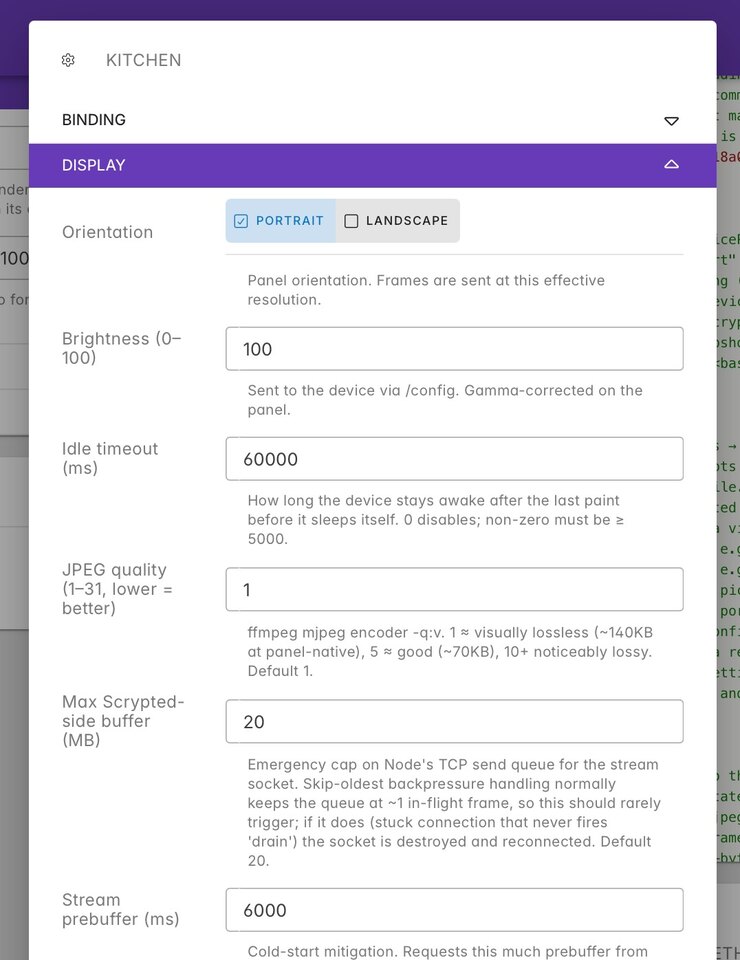
On a doorbell press or camera motion event, Scrypted wakes the display, spawns one ffmpeg child that pulls the
camera's prebuffered substream, scales and rotates it to the panel's native resolution, and streams framed MJPEG over
the raw TCP socket. Opening ffmpeg on an already-buffered keyframe is what cuts wake-to-first-frame from ~5–6 seconds
down to about 0.7 seconds. One catch: Scrypted's rebroadcast prebuffer is only enabled on the high-resolution stream by
default, and the display pulls the medium substream, so prebuffering has to be turned on for the medium stream too.
Without it the fast start silently falls back to a cold ~5–6 second open.
On the wire it sustains painted = sent = 24 fps with sub-50 ms glass-to-glass latency, the source frame rate rather than the device being the limit.
Compared to the Pi prototype this is dramatically simpler on the display device: no mpv, no RTSP parsing, no Protect
WebSocket handling, no software H.264 decode, no OS. All of that complexity moved to Scrypted, where it belongs and
where it's shared across every display.
A hardwired path
There's a compounding benefit once the whole chain is wired. My cameras and doorbell are PoE, the Apple TV is on Ethernet, and the displays are PoE. When an event occurs, a doorbell press or motion at a side gate, there's no wireless hop anywhere between the sensor and the glass. The stream is already prebuffered on a wired NVR and it lands on a wired display across a wired switch, so it loads instantly instead of stalling the way a Wi-Fi camera feeding a Wi-Fi tablet does. Latency and reliability stop being things I think about, because there's no radio in the path to be congested, roamed off of, or dropped.